Troubleshooting for Widex hearing aids

The hearing aid is not working at all

Step 1: Restart the hearing aids

  • Rechargeable models: Press and hold the button on the hearing aid to turn it off. Press and hold again to turn it back on. If your hearing aid has no button, place it in the charger for 5 seconds, then remove.
  • Battery-powered models: Open the battery door, then close it.

Step 2: Check the battery

  • Rechargeable models: Place them in the charger and check the LED lights. Refer to the user instructions for model-specific LED behavior.
  • Battery-powered models: Remove the old battery and insert a new one.
  • Widex app users: If your hearing aids are compatible with the Widex app, you can check the battery status on the app’s home screen.
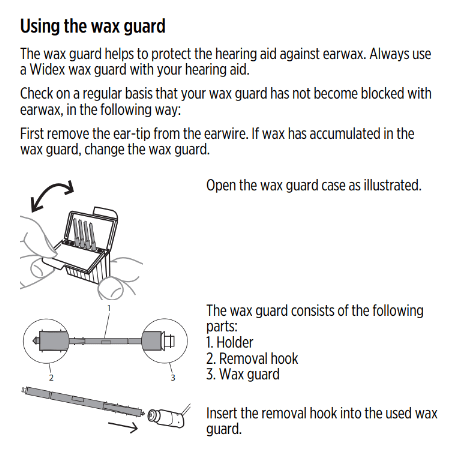
Many Widex hearing aids have a wax guard near the speaker that protects against buildup. Replace the guard as soon as it looks clogged, or as recommended by your Hearing Care Professional. If you require additional wax guards, please reach out to your Hearing Care Provider.

Make sure your ears are not clogged with earwax. Your Hearing Care Professional can inspect your ear canals to make sure they are clear of any earwax or obstruction that could prevent you from hearing the hearing aid output.

If the microphone openings of the hearing aids are clogged, this could prevent the hearing aid from receiving any sound, thereby muting any output. Using a small cleaning brush, gently brush the microphone openings on the back, face, and front of the hearing aid. These are usually tiny slits or openings near the buttons or battery door of the hearing aid. Visit your Hearing Care Provider if a preliminary cleaning does not resolve your issue.
There may be a hardware issue, or a component of your hearing aids may need to be replaced. Please consult your hearing care provider for in-person troubleshooting.
Consult your Hearing Care Professional.

The sound from the hearing aid is distorted

Reducing the volume- manually or by the Widex app can help. High volume may sometimes cause sound distortion, especially in noisy environment. 
Replace the battery manually. If  your hearing aids are rechargable, make sure they are fully charged. Low power can affect sound clarity. 

Replace the ear tip and wax guard. Insert the video for replacing eartip and wax guard. 

 If distortion continues, your Hearing Care Professional may need to check for internal damage or calibration issues.

The hearing aid is making a whistling sound

Remove and reinsert the hearing aid to ensure it fits securely and comfortably in your ear. A poor fit can cause sound to leak from the ear canal, which may be reamplified by the hearing aid and typically sounds like loud whistling. If the whistling continues, please consult your Hearing Care Professional. 

Try lowering the volume. Excess amplification can cause the hearing aid to feedback on itself.

Replace the ear tip and wax guard.

The hearing aid is not charging

Make sure the charger is firmly connected to a working power outlet. Try a different socket if necessary, and always use the supplied power cable to ensure the correct voltage. 


Take the hearing aids out of the charger and reinsert them. Ensure there is no debris inside the charging wells of the charger.  

Gently clean the hearing aids metal charging contacts with a soft, dry, cloth to remove dust, wax, or other residue.

Use a dry cloth or soft brush to clean the gold charging base/pins. Do not use liquids.

More troubleshooting tips

Your hearing aids will automatically turn off when the battery is empty. Charge the hearing aids as soon as possible.

If the tones occur periodically, try charging the hearing aids for at least 30 minutes or replace the battery. Afterward, check if the tones persist. If they do, please consult your Hearing Care Professional. 


Please see the Connectivity & pairing page for details on troubleshooting.

Need more support?

If the troubleshooting tips didn't help or you encountered further problems, try out the sections below or consult your Hearing Care Professional for support.

Connectivity & pairing

Device compatibility

Maintenance & cleaning

Find your Hearing Care Provider

Consult the user guide of your hearing aid for more information

Use our document library to find and download pdfs relevant for your product.
 
Widex Document Library
Go to the top