Troubleshooting for Widex hearing aids

The hearing aid is not working at all

Try this first:

1) Make sure the hearing aids are fully charged or have new batteries.

2) Restart the hearing aids. Rechargeable models: Place them in the charger for 5-10 seconds, then remove. Battery models: Open and close the battery door.

3) Ensure the charger is showing solid green lights.                                                                                       

4) If fully discharged, charge for at least 30 minutes                                                                                                                   

5) Observe the status LEDs on the charger. You can also check the status of the batteries from within the Widex app to see if the hearing aids are starting up and connecting to the phone.
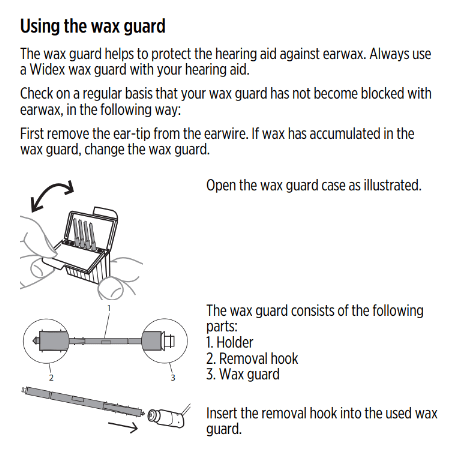
Many of Widex hearing aids have a wax guard near the speaker that protects against buildup. Replace it as soon as it looks clogged or as recommended by your hearing care professional. If additional wax guards are required, reach out to your hearing care provider.

Make sure your ears are not clogged with earwax. Your hearing care professional can inspect your ear canals to make sure they are clear of any earwax or obstruction that could prevent you from hearing the hearing aid output.

If the microphone openings of the hearing aids are clogged, this could prevent the hearing aid from receiving any sound, thereby muting any output. Use a cleaning brush, brush the microphone openings on the back/face/front of the hearing aid. These are usually tiny slits/openings near the buttons or battery door of the hearing aid. Visit your Hearing Care provider if a preliminary cleaning does not resolve. 

The sound from the hearing aid is distorted

Go to the top